Jump To:   

Must Have for Travel - Travel Insurance

Must Have for Travel - Travel Insurance

"May the odds be ever in your favor" when you travel.
But if they happening to not favor you, travel insurance is very helpful

Why you need Travel Insurance
No one cares more about your money and well being than you do. There are good deals and times to splurge and there the other times when you should save. Travel insurance, as we have found out first hand, is essential for a trip. While you spend some upfront, this precaution will save you lots of headache, as well as money, later on.

It will only take one incident or accident to clarify the importance of being insured in a foreign country. You never know what will happen once you are there. The truth about getting injured overseas can really hurt

Travel advisories for other countries can be found here

Is Travel Insurance Worth It? This Tool Will Put It Into Perspective
Travel Insurance Scenarios

Why Buy Travel Insurance


RoamRight travel insurance, cover your next trip!

Should I Buy Travel Insurance? What does it cover?

Trip Cancellation – protects you in the event that you might need to cancel the trip. There are quite a number of reasons that this might happen, but the most common is sickness, injury, or death. There are plenty of stories of unforeseen circumstances that prevent folks from taking off.

Trip Interruption – this is similar to trip cancellation, but in this case, you are already on the trip and for one reason or other, have to leave. This can be due to tour provider changes, weather, or health reasons such as sickness or injury. Trip interruption insurance will protect your investment for a variety of reasons.

Trip Delay/Missed Connection – a snow storm has just dumped 2 feet of snow and your flight is cancelled. You are going to miss the ship’s departure.

Loss Baggage/Baggage Delay – If you have ever had your bags end up in different location than you are or just thought they might have, you know the feeling and the headache of missing luggage. The hassle and potential financial loss is huge. Not only would have to buy all the things you need again, but now you are paying double and spending your vacation time worrying about it. This type of insurance reimburse you for the things that are now missing, so that you don’t have to go out and pay to replace everything all by yourself. One note of caution though. Some travel insurance policies limit the amount they pay out on each specific item. So, if you’re travelling with an expensive camera, it is a good idea to insure it separately.

Emergency Accident/Sickness Medical Expense – have an accident, and need medical attention? This will protect your financial loss. An absolute must when traveling overseas.

Emergency Medical Evacuation/Repatriation – if you’re unable to get the medical attention you need, this will reimburse you for the airline flights, and necessary medical attention to get you from one place to another.

Travel Assistance & Concierge – if something happens, you pick up the phone and someone will walk you through your particular issue.


RoamRight travel insurance

How to Choose Travel Insurance

I found a great explanation and things to look for when shopping for travel insurance on Bootsnall blog: bootsnall.com/articles/15-07/travel-insurance.html
And one from REI: rei.com/learn/expert-advice/travel-insurance.html

Compare Travel Insurance plans by the leader in travel protection - Travelex Insurance!

How to Avoid Travel-Insurance Gotchas
smartertravel.com/here-how-to-avoid-travel-insurance-gotchas.html

RoamRight cruise travel insurance

Sound-off: What do you think about travel insurance? Yay or Nay? Do you get it when you travel? Let us know below

Follow us via RSS RSS Feed or Sign up for free blog updates

How Daylight Saving Time Is Like Jet Lag

How Daylight Saving Time Is Like Jet Lag

Daylight Saving Time (United States) 2015 end on Sunday, November 1

5 Ways To Recover from Jet Lag/Daylight Saving Time:

1 – Exercise
2 – Keep The Lights On
3 – Sip Something Soothing
4 – Limit Screen Time Before Bed
5 – Create A Bedtime Ritual

Check out the article How Daylight Saving Time Is Like Jet Lag And 5 Ways To Recover on TheTravelBite.com that has these great tips in full detail


Sound-off: What do you think? Let us know below

If you found this page useful in your gadget search, please recommend us:
Follow us via RSS RSS Feed
Sign up for free blog updates

Top Travel Tech Gadgets Posts This Month

Top Travel Tech Gadgets Post This Month


New iOS Features - Hey Siri And Live Photos
How They Are Useful For Travel
http://traveltechgadgets.blogspot.com/2015/10/hey-siri-and-live-photos-ios-features.html

Baseball Postseason Best (And Worst) Stadiums' WiFi
http://traveltechgadgets.blogspot.com/2015/10/baseball-postseason-best-and-worst.html

New Cool Up-and-Coming Travel Gadgets - October
http://traveltechgadgets.blogspot.com/2015/10/new-cool-up-and-coming-travel-gadgets_8.html

Aruba - Family Vacation - Gadgets and Accessories
http://traveltechgadgets.blogspot.com/2015/10/aruba-family-vacation-gadgets-and.html


Sound-off: What do you think? Let us know below

If you found this page useful in your gadget search, please recommend us:

Follow us via RSS RSS Feed
Sign up for free blog updates

Travel News - Gadget Related

Travel News - Gadget Related


Movies & Shows Are Now Up In The Air:

Netflix on Virgin America
These companies announced a deal where travelers on Virgin America planes will be able to access their Netflix account right in there seat and stream shows and movies via WiFi. Virgin America is putting in new technology on all of its new planes with satellite-based Internet connectivity that is designed to get over the technical hurdles that prevent streaming video and other bandwidth-intensive services while in flight.
virginamerica.com/virgin-america-teams-up-with-netflix-to-offer-travelers-free-wifi-access


Amazon Prime on JetBlue
JetBlue has satellite-powered Wi-Fi, called Fly-Fi, to provide free, basic internet access on its flights. Similar to the deal above, JetBlue and Amazon have announced a partnership that will let passengers enjoy unlimited, on-demand entertainment. Passengers with Amazon Prime memberships will be able to watch movies and TV shows at 35,000 feet, at no additional cost to their membership. While customers can use JetBlue's free Wi-Fi tier, they will still have to pay whatever Amazon rental fees apply.

Here’s How Airplane Wi-Fi Works

From Travel Blogs:

My Favourite Travel Photography Gear
notwithoutmypassport.com/travel-photography

Travel Gadget: Canon EOS M3 Review
outoftownblog.com/canon-m3

Travel Tip: Risky Places to Use Free Wi-Fi Hotspots
petergreenberg.com/travel-tip-ricky-places-use-wi-fi-hotspots

7 useful travel gadgets
www.atlasandboots.com/useful-travel-gadgets

Julie’s gadget diary – Vacation tech lessons learned and a few travel tips
the-gadgeteer.com/julies-gadget-diary-vacation-tech-lessons-learned-and-a-few-travel-tips/


If you found this page useful in your gadget search, please recommend us:
Follow us via RSS RSS Feed
Sign up for free blog updates

Aruba - Family Vacation - Gadgets and Accessories

Aruba - Family Vacation - Gadgets and Accessories

Charging Up Before The Trip

Getting There

The flight was the first one for our kid. It went well for the most part at the airport and during flight. To keep her occupied and get some of the energy out we got her a new small ball. She played with it while waiting to board. The ball is the non-rolling kind with bumps that prevent it from rolling away but at the same time has plenty of bounce. And it also lights up, making easy to find if it does end up under a bag or seat.
While getting ready and before packing, I looked through some of my favorite kid travel blogs to get some ideas and advice. Based on those suggestions we brought a lot of entertainment with us on the plane in her little backpack. There was a Fisher-Price Travel Doodler, small travel books, kids camera that shows different image upon click, stuffed animal, and washable crayons. And with all of that we almost exhausted all in first half hour. Though after see settled in a bit, it was better and the Jetblue in-flight entertainment helped a bit. We had the Mickey Mouse cartoon on all monitors.
On the plane we were in the first row (thanks to planing and booking by gowithirene.com). While we were first out on arrival, what we did not expect was that we had to wait for the stroller to catch up to us. Though by the time we were at the baggage carousel our bags were there as well.
In Aruba at customs, they had new machines for folks with the new e-passports. One person steps through at a time. Places there passport on scanner, looks up for camera and once all set, goes through. The line moved very quickly with this new technology.

When we stepped outside, lucky for us they were having the hottest day yet. It didn't let up for next few days

Gadgets and Accessories

Cameras:

- Olympus Stylus Tough - our blue all around camera. Since this camera is waterproof, shockproof, crushproof, and dustproof, it goes with us into the water, to dine, and on walks and  evening events. I just put it in my pocket and good to go. In the water, we also attach the orange camera float strap that keeps the camera dangling on our wrists and floating above water.


- DSLR - While Olympus camera is great and versatile, it does not take as good of a shots as DSLR. Our Canon Rebel XSi comes with us on every vacation to capture some of the more detailed, high definition, and artistic photos, some of which you saw on this site in previous posts.

- GoPro - This was the newest camera on our trip. We have been looking to get a video camera since our kid was born, but it has been a tough choice. Most of the dedicated video cameras had very low features with very high prices that didn't make sense since we had similar video quality on the digital camera and phone. GoPro HERO4
on the other hand stood out for its lightness, small size, and superior video quality. Moreover, with the new cases it is also waterproof, has high-definition video and photography and very easy to operate. It became a no brainer for us to get GoPro for our trips.

- Phone - a necessity these days when traveling with child. Before leaving on vacation, we preloaded one of the iPhones with several gigabytes of kids cartoons and education videos. It was a life and sanity saver during the meal outings and other times of toddler hysterics. During the stay we did not have wifi and did not take the phone off of airplane mode as to not incur any roaming charges. Though we still were able to use for entertainment as well as notebook and memos.

- Phone Holder - to use the phone during meal times this little accessory was irreplaceable and we were very great we took one. The phone stayed off the table in right position for viewing and accessing controls. It folded up flat and was very light to just throw in our daypack with all the rest of the stuff.

- Mophie Powerstation - while we did charge our phone in the room overnight, it was definitely a piece of mind to have this juice pack with us as a backup as well as to give us a bit more up time at the airport.

- Kindle - we took both of our Kindles on this trip, though I was not too optimistic if we get to use them. As it turns out, I was not completely right. We had some time to read on the beach, since as it turns out the sand and sand toys were a great babysitter for our daughter for half-hour to almost an hour.

- Sports Watch - in most resorts there are activities and or shows that are at certain time. And meals are also at designated time. So a watch comes very handy. While at home, these days I mostly use the phone to tell time, that is not as easy convenient or safe to do while traveling. It is especially helpful when traveling with toddlers that need to be on their schedule or else (parents know what mean). The Casio watch I got is also great since it shows day of week which is helpful to know. And it is water proof up to certain depth. So could go swimming in the ocean or pool and be able to tell how long we been there and if it is time to reapply sunscreen or go eat.

- Water Shoes. A necessity these days in Aruba as the entrance and ocean floor can be rough and littered with rocks. We got some right before we left after we found recommendations for these on Tripadvisor (www.tripadvisor.com/Hotel_Review-g147248-d150690-Reviews-Tamarijn_Aruba_All_Inclusive-Oranjestad_Aruba.html). I had the Starbay Water Shoesshoes. These were easy to put on and take off which turns out to be a very good feature for water shoes.

- Belkin surge protector with multiple plugs. Hotel had several plugs but all accept one were behind furniture

- Travelon perfume holder - I wrote about it before and I take most of it back. I can still see how it could be useful when traveling, however it does not work. I loaded it up for this trip and when we got there there was nothing left in the container. All leaked out. I checked that it was closed tightly and it was. Thankfully, it was in its own ziplock that was inside another Ziploc, so nothing around it ended up all of the contents.

All these gadgets withstanding, this trip was a detox from computers and online access to the phone


Coming up next:
Aruba Vacation - Kids Gadgets and Accessories

Sound-off: What gadgets do you bring with you on holiday? Let us know below

If you found this page useful in your gadget search, please recommend us:

Follow us via RSS RSS Feed
Sign up for free blog updates

Baseball Postseason Best (And Worst) Stadiums' WiFi

Baseball Postseason Best (And Worst) Stadiums WiFi

As a precursor to the MLB World Series due to start next week, RootMetrics performed a study on wireless services across all of the baseball stadiums. Below are some of the results. You can see the full report here.
As of last night the showdown will be between NY Mets and Kansas City Royals. Currently, only Mets from NLCS are through to the Finals. Their opponent will be either Toronto Bluejays or Kansas City Royals. Based on the cell phone performance, sports fans attending the games would have fared much better at the Toronto stadium. The worst mobile performance was seen at Kauffman Stadium in Kansas City. And since that's the venue for first few games, bring some signal boosters and patience.


Related Content:
Travel Gadgets for the Traveling Sports Fanatic
Mets Fans Baseball Essentials
5 Essential Winter Travel Gadgets


Sound-off: What do you think? Let us know below

If you found this page useful in your gadget search, please recommend us:

Follow us via RSS RSS Feed
Sign up for free blog updates

Hey Siri And Live Photos iOS Features - How They Are Useful For Travel

New iOS Features - Hey Siri And Live Photos
How They Are Useful For Travel


September was eventful for Apple. It has introduced a new version of iPhone 6,new iOS with some cool features, Apple Pencil, and iPad Pro. The two quite useful features are "Hey Siri" option and Live Photos.

How They Are Useful For Travel

"Hey Siri"
Hey Siri option lets you control your phone without touching it at all. Just by saying "Hey Siri" you would activate the virtual assistant. Then you can say various commands, such as set a reminder and many more, and you would be able to just speak and Siri will follow. This is very useful while traveling if you want to take notes, jot down your impressions, look up things on internet and all without having to take out your phone and talk into it. It is also useful on the road trip if you want to do similar functions without taking your hands off the wheel.
How to set up "Hey Siri":
Go To Settings > General > Siri. On the second line, Allow "Hey Siri," toggle the switch to on. Done

Sample questions you can ask Siri:
"Show me directions to"
"Read my latest email"
"Text Name ‘See you soon"
"Find pics from my trip to Aspen in 2014"
"Find a table for four tonight in Chicago"
"Shuffle my Road Trip playlist"
"When is sunset in Paris?"
"How’s the weather tomorrow?"
"Where am I?"

Travel photos come to live
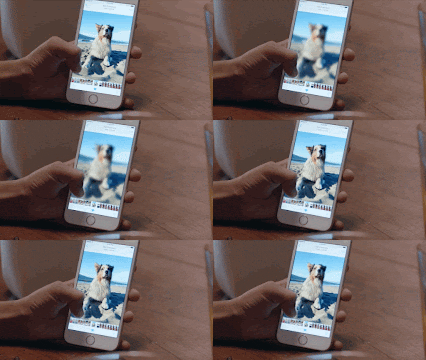
Live Photos brings audio and motion to pictures taken with the device. It captures motion and audio 1.5 seconds before the picture is taken and 1.5 seconds after it, the feature starts recording before you even capture the event and its continuously buffered from the moment the camera app is launched. You can bring those moments to life anytime simply by pressing anywhere on the photo. To visualize it better, it is similar to the photo displays within the Harry Potter movies :)
This is great for taking travel photos as you don't always have a video camera to capture the moment and you will be able to see a bit more of the memory when reviewing your trip.

Turn Live Photos ON or OFF on iPhone Camera:
Open the Camera from either the iPhone lock screen or the Camera app
Tap the little bullseye looking circle icon near the top of the screen to toggle Live Photos ON or OFF. If it is yellow, the feature is on. If grey, it is off.

Additional new features within iOS9 What’s new in iOS


Sound-off: What smartphone features do you find useful when traveling? 
Let us know below

If you found this page useful in your gadget search, please recommend us:

Follow us via RSS RSS Feed
Sign up for free blog updates